Evaluating the Nursery Name Signs Laser Cut Bundle CNC for Custom Decor Projects
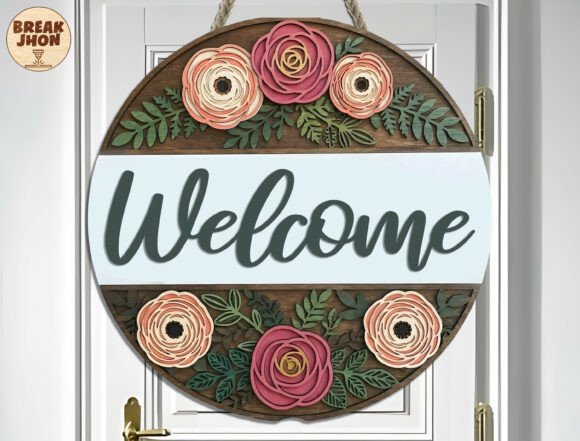
Creating personalized decor for a child's room often involves balancing aesthetic appeal with technical feasibility. For makers, small business owners, and hobbyists equipped with laser cutting technology, digital design bundles serve as the foundational blueprint for physical products. The Nursery Name Signs Laser Cut Bundle CNC represents a specific category of digital assets designed to streamline the production of 3D name signs, door hangers, and wall art. Understanding the composition, compatibility, and practical application of these files is essential before integrating them into a workflow.
Understanding the Digital Asset Composition
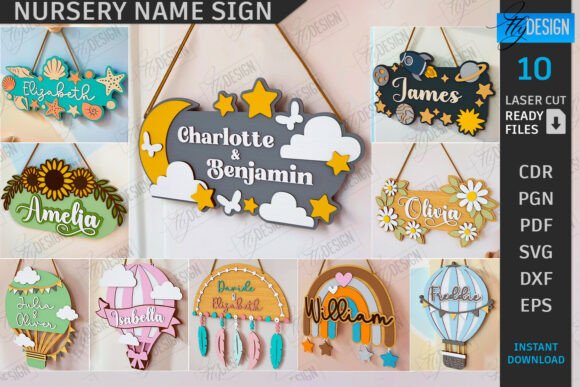
At its core, this product is not a physical sign but a comprehensive collection of vector and raster files intended for computer-controlled manufacturing. The bundle typically includes ten distinct design variations, provided in multiple formats to ensure broad software compatibility. Users receive SVG, EPS, PNG, PDF, and DXF files for each design. This variety is critical because different laser cutting software and machines interpret data differently. For instance, while SVG files are universally supported by web-based cutters and programs like Cricut Design Space or Silhouette Studio, they can sometimes present scaling issues in industrial-grade software.
The designs within the Nursery Name Signs Laser Cut Bundle CNC are engineered specifically for layered construction. They utilize a color-coded system to dictate machine operations: red lines indicate where the laser should cut through the material, while black lines denote areas for engraving. This distinction allows the operator to create depth and texture, transforming flat sheets of wood or acrylic into three-dimensional signage. The inclusion of both cut and engrave paths means the user can produce intricate details, such as textured backgrounds or outlined letters, without needing to manually draw these elements from scratch.
Technical Compatibility and Software Considerations
One of the most significant factors in selecting a digital bundle is software interoperability. While the presence of five file formats suggests versatility, experienced operators know that format choice impacts precision. A notable consideration involves users of LightBurn, a popular software for CO2 and diode lasers. As noted in technical documentation for similar assets, LightBurn may occasionally distort dimensions when importing SVG files due to how the software handles viewBox attributes and unit conversions. In these scenarios, the DXF file format included in the bundle is often the superior choice. DXF files tend to maintain strict dimensional accuracy, ensuring that the final cut pieces fit together perfectly without unexpected gaps or overlaps.
Furthermore, the utility of the PNG files should not be overlooked. While PNGs are raster images and cannot be directly cut by a laser without vectorization, they serve as excellent references for previewing the final look or for use in marketing materials. If a user requires a specific color variation or size for a mockup, many creators offer the flexibility to request custom PNG adjustments, adding value to the initial purchase. However, for the actual manufacturing process, reliance on vector formats (SVG, EPS, DXF) remains mandatory to achieve clean edges and precise joints.
Benefits for Makers and Small Businesses
The primary advantage of utilizing a pre-made bundle like the Nursery Name Signs Laser Cut Bundle CNC is efficiency. Designing a structurally sound 3D name sign from scratch requires a deep understanding of kerf compensation, material thickness, and joinery mechanics. By purchasing a tested bundle, users bypass the trial-and-error phase of design. The files are presumably optimized for standard material thicknesses, reducing the risk of assembly failure. This allows the maker to focus on material selection, finishing techniques, and customization rather than geometric problem-solving.
Additionally, these bundles support scalability. For a home-based business looking to expand its product line into nursery decor, having a library of ten ready-to-use designs enables rapid prototyping. A maker can produce a sample using scrap material to verify the fit and finish before committing expensive hardwoods or premium acrylics. The ability to quickly swap between different font styles and decorative motifs within the same bundle also allows for offering a wider range of options to customers without increasing design overhead.
Tradeoffs and Limitations
Despite the conveniences, there are tradeoffs to consider. The most obvious limitation is the lack of exclusivity. Since these are digital downloads, other makers possess the exact same design files. In a saturated market, this means differentiation must come from material quality, finishing skills, and customer service rather than unique design IP. Furthermore, while the files are versatile, they are not universally adaptable to every machine setup without adjustment. Users must still account for their specific laser's kerf (the width of material removed by the laser beam). If the files were designed for a 0.1mm kerf and the user's machine operates at 0.2mm, the joints may be too loose unless the user scales the components or adjusts the offset in their software.
Another consideration is the learning curve associated with layer management. To achieve the intended 3D effect, the operator must correctly assign layers for cutting versus engraving. Misinterpreting the red and black line instructions can result in a piece being engraved when it should have been cut, potentially ruining the material. Therefore, a basic proficiency in laser operation software is a prerequisite for successfully utilizing this bundle.
Ideal Use Cases and Alternatives
This product is a strong fit for individuals who already own a laser cutter or CNC router and are seeking to diversify their output with minimal design time. It is particularly suitable for Etsy sellers specializing in baby showers, newborn gifts, or nursery makeovers. It is also valuable for interior decorators who need custom signage for client projects but lack in-house graphic design resources.
However, alternatives may be worth considering for those without equipment. Individuals looking for a one-off sign for their own home might find it more cost-effective to hire a local maker or purchase a finished product rather than investing in the machinery and files required to produce it. Similarly, professional graphic designers who require complete creative control over typography and layout might prefer creating custom vectors from scratch rather than adapting pre-set templates. For those whose primary goal is vinyl cutting rather than laser engraving, while SVG files are compatible, the specific engrave/cut layer logic of this bundle may be less relevant.
Making the Decision
Ultimately, the decision to acquire the Nursery Name Signs Laser Cut Bundle CNC depends on the user's current capabilities and goals. If the objective is to efficiently produce high-quality, layered wooden or acrylic signs with proven structural integrity, this bundle offers a robust starting point. The inclusion of DXF files addresses common software pitfalls, and the variety of formats ensures accessibility across different platforms. However, success relies on the user's ability to manage machine settings, account for material variances, and add unique value through craftsmanship. For those prepared to handle the technical aspects of laser cutting, this resource serves as a practical tool to accelerate production and enhance product offerings.