Crafting Your Own Miniature World: A Guide to Laser Cut Coffee Shop Roomboxes
In the intersection of modern technology and traditional craftsmanship lies a thriving hobby that has captured the hearts of DIY enthusiasts, architects, and miniature collectors alike: the laser-cut roombox. Specifically, the Mini Coffee Shop Roombox represents a perfect blend of architectural precision and cozy aesthetic appeal. Whether you are a seasoned maker with a Glowforge or a beginner exploring the world of digital fabrication, understanding how these intricate models come to life can transform a simple kit into a cherished piece of art.
This article explores the significance of laser-cut miniature dioramas, the technical aspects of preparing files for CNC and laser machines, and why creating a tiny cafe model is more than just a pastime—it is an exercise in patience, design, and spatial reasoning.
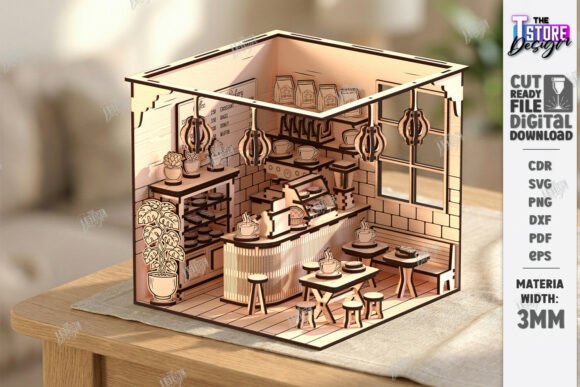
The Appeal of the Miniature Coffee Shop
Why a coffee shop? For many, the cafe represents a "third place"—a social surrounding separate from the two usual social environments of home and the workplace. Recreating this space in miniature allows hobbyists to capture a specific mood: warmth, community, and relaxation. A Miniature Bakery Dollhouse or a Tiny Cafe Kit offers a canvas for storytelling. Every tiny chair, every microscopic pastry display, and every engraved sign contributes to a narrative that fits in the palm of your hand.
These models are not merely toys; they are detailed dioramas that serve as decorative pieces for shelves, desks, or shadow boxes. The trend has surged in popularity due to the accessibility of desktop laser cutters. What once required industrial machinery can now be achieved on a kitchen table, making the Laser Ready Miniature Store concept accessible to the general public.
Understanding the Technology: Laser Cutting and CNC
To successfully build a 3D Coffee Shop Roombox, one must understand the tools involved. Laser cutting uses a high-powered laser to cut or engrave materials, typically wood, acrylic, or cardboard. The process is guided by vector files, which tell the machine exactly where to move.
When you purchase a digital product like a SVG Coffee Bar Dollhouse Furniture pack, you are buying the instructions for the machine, not the physical object. The precision of laser cutting allows for interlocking joints that hold the 3D puzzle together without glue, although adhesive is often recommended for stability and detail work. This technology bridges the gap between digital design and physical reality, allowing for complex geometries that would be nearly impossible to achieve with hand tools alone.
File Formats and Compatibility
A common point of confusion for beginners is file compatibility. A high-quality DIY Coffee House Model Kit will typically include a zip archive containing multiple file formats to ensure broad compatibility. These usually include:
- SVG (Scalable Vector Graphics): The most common format for web-based laser software like Glowforge.
- DXF (Drawing Exchange Format): Preferred by users of AutoCAD and other professional CAD software.
- EPS (Encapsulated PostScript): Often used in Adobe Illustrator and CorelDRAW.
- PNG (Portable Network Graphics): Useful for reference images or engraving raster graphics.
- PDF (Portable Document Format): Great for viewing dimensions and printing paper prototypes.
It is crucial to verify that your cutting machine and software are compatible with these formats. If you find yourself needing a different file type, reputable sellers often encourage customers to message them for assistance, ensuring that technical barriers do not hinder creativity.
Decoding the Design: Red Lines vs. Black Lines
One of the most critical aspects of working with Laser Cut Files is understanding the color coding within the design file. In a standard Scaled Coffee Shop Model template, the lines are not arbitrary; they dictate the machine's action.
- Red Line – CUT: These vectors instruct the laser to cut completely through the material. This creates the edges of your walls, furniture, and decorative elements. The power setting for red lines is typically higher to ensure a clean break.
- Black Line – ENGRAVE: These vectors tell the laser to etch the surface without cutting through. This is used for details like wood grain textures, signage on the coffee shop facade, or patterns on the bakery items. The power setting here is lower, focusing on surface marking.
Misinterpreting these lines can lead to wasted material. For instance, if a cut line is mistakenly set to engrave, your pieces will remain attached to the main sheet, ruining the assembly. Always double-check your software settings before hitting "start."
From Digital File to Physical Diorama
The journey from a Wooden Roombox Diorama file to a finished product involves several steps. First, select your material. Birch plywood is a popular choice for its smooth finish and consistent layers, but MDF and acrylic are also viable options depending on the desired aesthetic.
Once the files are loaded and the material is secured, the laser cutter does the heavy lifting. However, the post-processing stage is where the magic happens. Removing the small, intricate pieces from the sheet requires patience. Sanding away char marks ensures a clean look. Assembly follows, often resembling a complex 3D puzzle. The Miniature Store comes together piece by piece, with walls slotting into bases and furniture finding its place within the rooms.
For those interested in customization, the digital nature of these files allows for modification. Experienced users might adjust the scale in their software to create a larger display piece or change the engraving depth for a more pronounced texture. This flexibility makes the Bakery Shop Glowforge Miniature Files a versatile resource for creative experimentation.
Practical Relevance and Educational Value
Beyond aesthetics, building a Laser Cut Miniature Bakery offers significant educational benefits. It teaches spatial awareness, as builders must visualize how 2D shapes fold and interlock to form 3D structures. It also introduces basic principles of engineering and architecture, such as load-bearing walls and structural integrity, albeit on a micro scale.
For educators, these kits can be powerful tools in STEM (Science, Technology, Engineering, and Mathematics) curricula. Students learn about computer-aided design (CAD), material science, and precision manufacturing. For adults, it serves as a mindful activity, reducing stress through focused, tactile work. The result is a tangible accomplishment that reflects both technical skill and artistic vision.
Common Misunderstandings
A frequent misconception is that laser cutting is fully automated and requires no skill. While the machine executes the cuts, the user must prepare the file, choose the right material thickness, and calibrate the machine’s focus and power. Another assumption is that all laser files are universal. In reality, kerf (the width of the laser beam) varies between machines, meaning a file optimized for one laser might fit loosely or tightly on another. High-quality providers often include notes on adjusting for kerf or offer support to help users troubleshoot fit issues.
Conclusion
The Mini Coffee Shop Roombox is more than a craft project; it is a gateway into the world of digital fabrication. By combining the precision of laser technology with the charm of miniature modeling, enthusiasts can create detailed, personalized spaces that bring joy and inspiration. Whether you are drawn to the technical challenge of processing SVG and DXF files or the artistic satisfaction of assembling a Tiny Cafe Kit, this hobby offers endless opportunities for learning and creativity.
If you are ready to start your journey, ensure you have the right files and equipment. Remember, if you need other types of files or specific PNG sizes, reaching out to the creator can often provide the custom support needed for a successful build. Follow your favorite designers to stay updated on future releases, and enjoy the process of bringing your miniature world to life.