Mastering the Laser Cut Stationery Desk Organizer: A Comprehensive Guide to Precision Crafting
In an era where digital clutter often mirrors physical chaos, the desire for a tidy, functional workspace has never been more pressing. Enter the Laser Cut Stationery Desk Organizer SVG, a digital blueprint that bridges the gap between creative imagination and tangible utility. Whether you are a hobbyist with a Cricut, a professional using a Glowforge, or a small business owner utilizing CNC machinery, understanding how to leverage these files can transform your approach to home décor and craft production. This guide explores the intricacies of these designs, their practical applications, and why they have become a cornerstone of modern maker culture.
What Exactly is a Stationery Organizer SVG?
At its core, an SVG (Scalable Vector Graphics) file for a desk organizer is a mathematical representation of a design. Unlike pixel-based images (like JPEGs or PNGs) which can become blurry when enlarged, vector files use points, lines, and curves to define shapes. This makes them infinitely scalable without losing quality—a critical feature when moving from a small preview on a screen to a full-sized cut on a sheet of wood or acrylic.
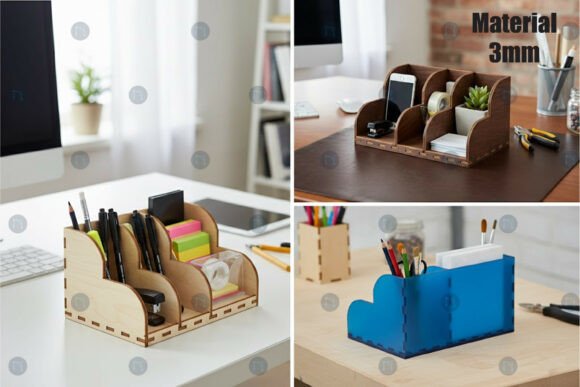
When we refer to a Laser Cut Stationery Desk Organizer SVG, we are talking about a specific set of instructions designed for precision cutting machines. These files contain the exact paths that a laser beam or blade must follow to cut out individual pieces of a puzzle-like structure. Once assembled, these pieces interlock to form a sturdy holder for pens, scissors, sticky notes, and other office essentials. The beauty of this format lies in its versatility; the same file can be used to create a prototype out of cardstock or a final product made from 3mm birch plywood.
The Significance of Precision in Craft Production
Precision is not merely a buzzword in the world of laser cutting; it is the foundation of structural integrity. A well-designed organizer relies on kerf compensation—the adjustment made to account for the width of material removed by the laser. High-quality SVG files intended for production are pre-adjusted for specific material thicknesses, commonly 3mm. If the slots are too wide, the organizer will wobble and fall apart; if they are too narrow, the pieces won't fit together at all.
For those engaging in craft production, whether for personal use or commercial sale, this level of precision ensures consistency. Imagine producing fifty units of a desk organizer for a local boutique. Without a precise digital file, each unit would require manual measurement and adjustment, leading to waste and inconsistency. With a optimized SVG file, every cut is identical, ensuring that the final assembly process is smooth and the end product looks professional.
Compatibility Across Machines and Workflows
One of the most common misunderstandings among beginners is that digital design files are locked to specific machines. In reality, a robust Laser Cut Stationery Desk Organizer SVG is designed for universal compatibility. However, the workflow varies slightly depending on the hardware you possess.
- Laser Cutters (Glowforge, xTool, Epilog): These machines excel at cutting through thicker materials like wood, leather, and acrylic. The SVG provides the cut lines, while the machine's software interprets the power and speed settings required for the specific material.
- Die Cutting Machines (Cricut, Silhouette): While primarily known for paper and vinyl, these machines can handle thin balsa wood or heavy cardstock. For these users, the SVG allows for intricate layered paper crafts that mimic the look of wooden organizers.
- CNC Routers: For larger scale production, CNC machines use similar vector paths (often converted to DXF) to carve organizers out of solid blocks of wood or plastic.
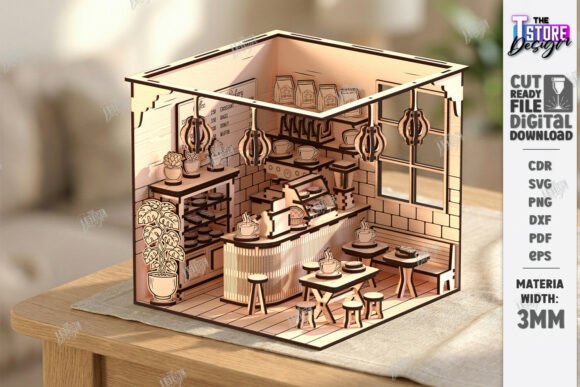
The inclusion of multiple file formats—AI, EPS, SVG, DXF, and PNG—in a single download package is crucial for this flexibility. AI and EPS files are ideal for graphic designers using Adobe Illustrator who wish to customize the aesthetic before cutting. DXF is the industry standard for CAD software and many CNC machines. Meanwhile, the PNG serves as a visual reference or a mockup element for marketing materials, often presented in a realistic 3D style to help customers visualize the final product.
From Digital File to Physical Reality: The Assembly Process
Understanding the file is only half the battle; the assembly is where the magic happens. Most stationery organizer designs utilize a slot-and-tab construction method. This technique requires no glue or nails, relying instead on friction and precise geometry to hold the structure together. This "flat-pack" furniture approach is highly efficient for shipping and storage.
- Material Selection: Choose your medium. Birch plywood is popular for its light color and strength, while acrylic offers a modern, transparent look. Ensure the material thickness matches the file specification (usually 3mm).
- Cutting: Load your chosen file into your machine's software. Perform a test cut on a scrap piece to verify settings.
- Cleaning: After cutting, gently remove the pieces. Laser cutting often leaves soot or residue on the edges, which can be wiped away with a damp cloth or lightly sanded.
- Assembly: Follow the logical sequence of interlocking tabs. Start with the base and build upwards. The fit should be snug but not forced.
This process is not only educational but also therapeutic. It engages problem-solving skills and provides a tangible sense of accomplishment. For educators, introducing students to this workflow combines lessons in geometry, engineering, and art.
Customization and Creative Freedom
A major advantage of working with vector files is the ease of customization. Unlike buying a pre-made plastic organizer, a digital file allows you to tailor the design to your specific needs. Do you need a dedicated slot for a stylus? Is there a requirement for a deeper compartment for rulers? With software like Adobe Illustrator, Inkscape, or CorelDRAW, you can modify the SVG before cutting.
You can also personalize the surface. Since the file separates the cut lines from the engraving lines (often distinguished by color in the vector file), you can add names, logos, or inspirational quotes directly onto the organizer. This capability makes these designs perfect for corporate gifts, wedding favors, or personalized back-to-school supplies. The ability to tweak the design ensures that the final product fits seamlessly into your unique workflow and aesthetic preferences.
The Role of Organizers in Modern Productivity
Why go through the trouble of making your own organizer when cheap plastic ones are available everywhere? The answer lies in the psychology of our environment. A cluttered desk can lead to a cluttered mind. Custom organizers allow individuals to curate their workspace exactly how their brain works. Furthermore, the act of creating the tool itself fosters a deeper connection to the workspace.
In the context of the "Maker Movement," creating your own tools is a statement of self-reliance and creativity. It shifts the consumer from a passive buyer to an active creator. For small businesses, selling laser-cut organizers represents a low-overhead entry into the e-commerce market. Since the primary asset is the digital file, inventory costs are minimized until a sale is made, allowing for agile business models based on on-demand production.
Common Pitfalls and How to Avoid Them
Even with the best files, mistakes can happen. One frequent error is ignoring material variance. Not all "3mm plywood" is exactly 3.0mm; it can range from 2.8mm to 3.2mm. Experienced crafters always measure their specific batch of material and adjust the slot widths in the SVG accordingly. Another misconception is assuming all lasers behave the same. A CO2 laser behaves differently than a diode laser, affecting the kerf width. Always run a calibration test.
Additionally, ensure your software is set to the correct units (millimeters vs. inches) upon importing the DXF or SVG. A scale mismatch can result in a miniature model or a massive structure that doesn't fit on your machine bed.
Conclusion: Empowering Your Creative Workflow
The Laser Cut Stationery Desk Organizer SVG is more than just a file; it is a gateway to precision crafting and personalized productivity. By understanding the technical aspects of vector files, material compatibility, and assembly techniques, you unlock the potential to create high-quality, functional art. Whether you are organizing your own home office or launching a line of handcrafted goods, these digital blueprints provide the reliability and flexibility needed to succeed. As technology continues to democratize manufacturing, the ability to translate a digital idea into a physical reality remains one of the most empowering skills of the 21st century.